

Latest Version
csylesoft
Security
Windows
4.99
9p4n5mmflr8z
Report a Problem
More About GitLocker
A Hands-On Look at Git Repository Encryption
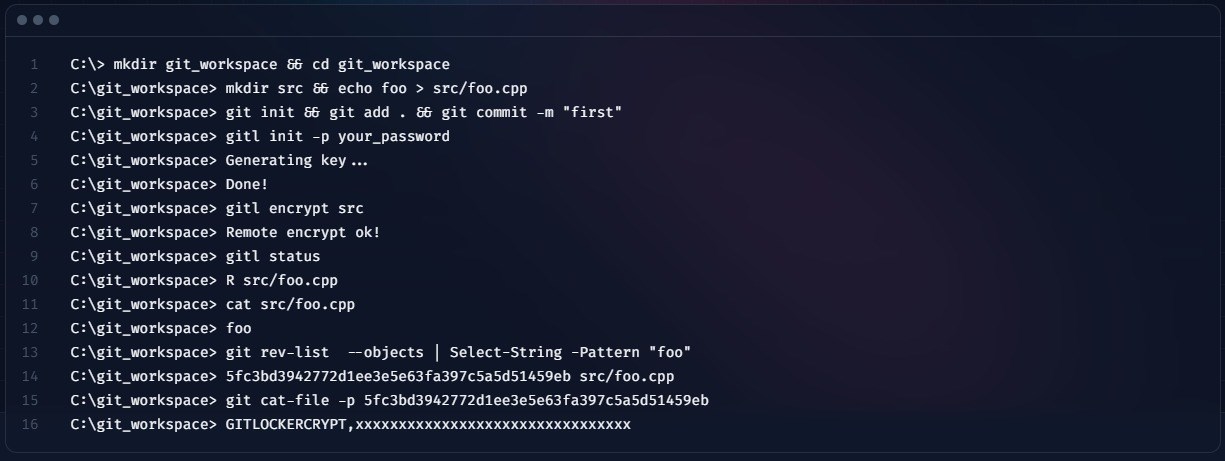
Managing sensitive codebases requires strict security measures, especially when collaborating across public or shared platforms. GitLocker git repository encryption addresses this concern directly by introducing transparent cryptography into your standard development workflow. When using this utility, your local workspace remains completely readable in plaintext, while the underlying repository data undergoes secure encryption before it is committed or pushed. This ensures that even if your remote repository is compromised, the source code remains protected from unauthorized eyes.
How the Workflow Feels in Practice
Unlike heavy graphical applications that disrupt your established command-line habits, this tool integrates directly into your existing environment. As a command-line utility optimized for Windows environments, it operates natively within Cmd or PowerShell. Once configured, the encryption and decryption processes run quietly in the background. You can continue running standard git commands without manual encryption steps, making the security layer virtually invisible during daily development tasks.
Key Features and Technical Requirements
- Transparent Cryptography: Keeps your active workspace in plaintext for easy editing while ensuring stored repository data is fully encrypted.
- Seamless Git Integration: Works alongside your standard version control commands without requiring a complete overhaul of your workflow.
- Lightweight CLI Design: Built specifically for developers who prefer the speed and efficiency of Command Prompt or PowerShell.
Setup and Installation Notes
Because this utility is built for technical professionals, it does require a brief manual configuration step before first use. Users must add the installation directory to their system's PATH environment variable. Once this path is configured, the command-line tool can be called globally from any terminal window, allowing you to secure your repositories immediately.
Is GitLocker Git Repository Encryption Right for You?
If you are a Windows developer seeking an uncomplicated, scriptable method to protect your intellectual property, this tool offers a highly focused solution. It avoids unnecessary interface clutter, focusing entirely on reliable repository security. To learn more or to purchase the utility, visit the official Microsoft Store page to get started.
Rate the App
User Reviews

Popular Apps









Editor's Choice